
Runway Gen-2
Runway Gen-2 is an advanced multimodal video generation model, allowing users to create videos from text prompts, images, or existing video clips. It was launched by Runway in Feb, 2023 as one of the first commercially available text/image-to-video models. Try Gen-2 below!
Text to Video Generation
With Runway Gen-2, users can create videos by simply entering descriptive text prompts. Its AI interprets these prompts to create video content, allowing users to visualize concepts that may not exist in reality.
See the following example provided by Runway:
Image to Video Generation
Gen-2's image-to-video feature enables the generation of videos based on an uploaded image, referred to as the "driving image". With this you can create dynamic content that reflects the essence of the original image.
Motion Brush
Runway Gen-2 features a powerful Motion Brush tool, which enables users to add controlled movement to specific areas of their video creations.
The Motion Brush allows users to paint over certain areas of an image, and then assign motion dynamics to the selected elements. This feature simplifies the video generation process: it allows users to create animations without needing complex inputs or extensive editing skills.
Cameral Control
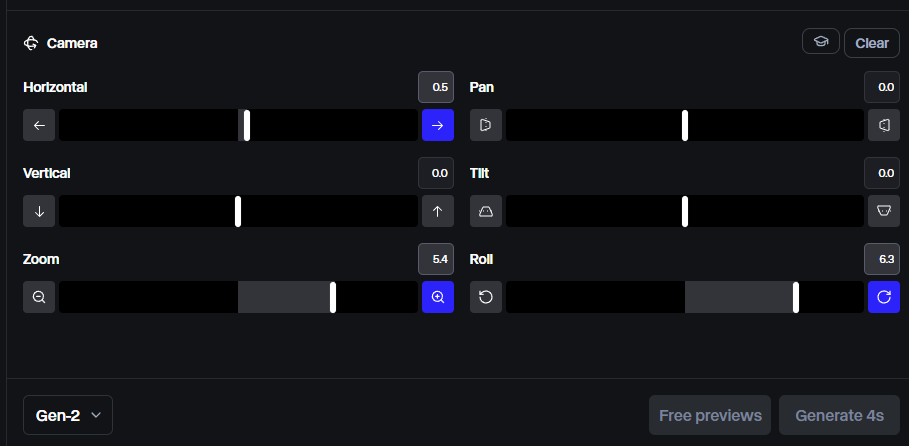
Runway Gen-2's camera control feature provides users with advanced capabilities to manipulate camera movements in their video creations. You can control the camera's movement in multiple directions, including horizontal/vertical movement, pan, tilt, zoom and roll.
Apply Styles to Videos
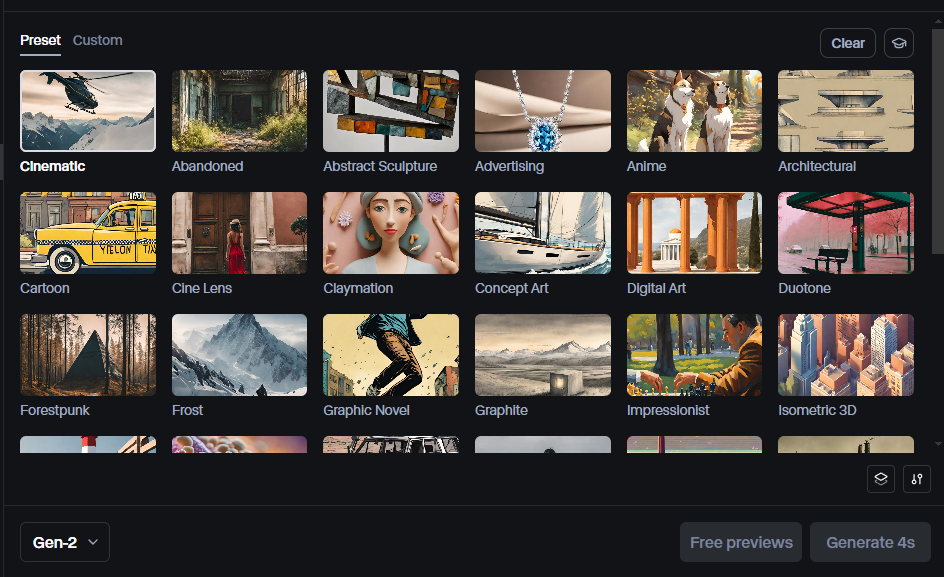
Runway Gen-2 offers an extensive range of styles you can apply to the generated videos, offering them a unique, appealing aesthetic. It offers over 30 preset styles for you to choose, including cinematic, anime, isometric and more. You can even create your own custom styles to apply to the videos.
Lip Sync
Runway's Lip Sync feature is an innovative tool within the Gen-2 platform that allows users to create videos where the face inside appears to speak in sync with an audio clip or saying a script. This feature is particularly useful for creating realistic talking animations.
Runway Gen-2 vs Gen-3 Alpha vs Gen-3 Alpha Turbo
1408 × 768px (Upscale off)
2816 × 1536px (Upscale on)
1280x768px
768x1280px
Runway Reviews on Reddit
Runway Gen-2 Video Reviews
Other Reviews on X
Experimenting with Runway Gen-2. The Motion Brush feature is neat, but those 4-second clips feel super limiting. #AIvideogeneration #RunwayMLhttps://t.co/H7XWV5jFFE pic.twitter.com/u7qsULrcfv — Taku Vibes Collective (@Taku_2024_) February 7, 2025
Experimenting with Runway Gen-2. The Motion Brush feature is neat, but those 4-second clips feel super limiting. #AIvideogeneration #RunwayMLhttps://t.co/H7XWV5jFFE pic.twitter.com/u7qsULrcfv
When the firewall is actually made of firePrompt in alt / Video with Runway Gen-2 pic.twitter.com/o7ukDldavx — S4MFI (@S4MFI) January 14, 2025
When the firewall is actually made of firePrompt in alt / Video with Runway Gen-2 pic.twitter.com/o7ukDldavx
Runway introduces Gen-2 🪄"If you can say it, now you can see it"Text-to-video will change content creation. Communication is about to be multi-modal. pic.twitter.com/hCNqL3f3p8 — Rachel Woods (@rachel_l_woods) March 20, 2023
Runway introduces Gen-2 🪄"If you can say it, now you can see it"Text-to-video will change content creation. Communication is about to be multi-modal. pic.twitter.com/hCNqL3f3p8
Useful Articles About Runway Gen-2
Explore additional articles on Runway Gen-2 to better understand this AI video model!
FAQs
Is RunwayML Gen-2 free?
Runway offers a free plan for its users to try Gen-2's features. This plan comes with limited credits and restrictions such as non-removable watermarks on every video output. For more features and usage, you can subscribe to one of their paid subscription plans.
What is the difference between Runway Gen-1 and Gen-2?
Runway Gen-2 represents a substantial upgrade over Gen-1, introducing the ability to generate videos from scratch using only text prompts or images, which was not possible in the earlier version. It features multiple modes for video creation, including text-to-video and image-to-video, and offers higher-definition outputs with improved realism and smoother motion.
What is the difference between Runway Gen-3 and Gen-2?
Runway Gen-3 advances from Gen-2 by offering high-fidelity video generation with remarkable speed. Gen-3 enables the generation of more realistic movements and complex actions. It also offers more advanced features such as video-to-video generation and Act-One.
What are the best practices of creating prompts for Runway Gen-2?
The best practices of writing prompt for Gen-2 include using the structure [subject] in the style of [style or aesthetic], incorporating verbs to enhance action and movement in your prompts, and using camera-related terminology to guide the visual style.
How to use the motion brush of Gen-2?
We have a detailed guide on how to use Motion Brush in Runway. Read the article and see if it can help you get a better understanding of this feature.