
CapCut AI Video Editor
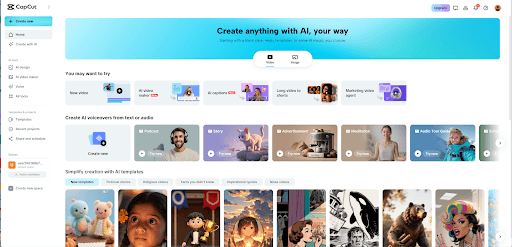
Owned by Bytedance, CapCut is an AI video editor that strikes a balance between one-click automation and manual control, allowing users to produce and edit short-form videos, such as TikToks, Reels, and Shorts. Built for mobile creators , it automates scriptwriting with access to AI avatars, scene templates, and more, for fast and consistent video creation. Try using CapCut now!
Key Features of CapCut
Instant AI Video Generation: Produce ready-to-share videos using text-to-video in minutesCapCut AI Brainstorming: Skip creative blocks with automated scriptwriting and storyboard outlinesAdvanced AI Video Editor: Access AI editing controls for more detailed video refinementMedia-to-Script Matching: Upload multiple videos and a script to craft a tailored visual narrativeStock Media & Template Library: Use stock media and AI video templates for quick video creationAI Talking Avatars: Browse 100+ digital avatars or create a digital clone to produce presenter videos
Instant AI Video Generation
CapCut lets users produce full visual narratives in minutes by inputting a descriptive text prompt of the idea or an existing script. Even with no prior editing experience, all it takes is one-click for anyone to get a polished, ready-to-share video with the scriptwriting, storyboard structure, pacing, and visuals, all handled automatically.
| Prompt | Output Video |
| A middle-aged male business professional is drinking coffee in a café. |
CapCut AI Brainstorming
With CapCut, users can turn basic ideas into fully developed video topics, scripts, and storyboard outlines in just a few clicks. This allows brands, marketers, and online creators to skip over creative blocks and planning stages for faster iteration, making it easier to nail down a clear direction across all video projects.
| Prompt | Output Video |
| Promotional video for drones, showcasing how customers can view the world from the drone's perspective. |
Advanced AI Video Editor
CapCut offers smart AI editing tools that help users tailor and refine their videos with professional-grade results in just a few simple clicks, creating opportunities for branded content. Even as a beginner, you can effortlessly customize scenes by adding intros, outros, captions, visual effects, transitions, background music, voiceovers, and more.
| Prompt | Output Video |
|
Showcasing the magnificent scenery of the desert from sunset to dusk, with the color palette transitioning from a warm orange-yellow to a cinematic teal-orange hue. |
Media-to-Script Matching
CapCut enables users to upload multiple existing videos and a script, allowing anyone to create a custom visual narrative with just one click. The AI automatically matches these scenes with the flow of the written script, while also providing access to AI voiceovers for narration, helping you skip hours of manual video editing.
| Prompt | Output Video |
| A confident and capable Asian male CEO in his 40s stands behind a podium in a modern boardroom and says in English: "Our vision for the future is clear." |
Stock Media & Template Library
CapCut provides access to a vast library of royalty-free stock audio, animations, effects, and videos that you can freely use to edit and enhance your visual narrative in one click. Users can also use ready-made templates in different styles across themes like education, news, inspiration, and more, for specific video creation needs.

Realistic AI Talking Avatars
With over 100+ pre-built AI talking avatars available on CapCut, users can create presenter-style video content with custom narration by simply inputting a script or audio recording. Alternatively, you can upload a subject image or video recording to build a personal digital clone with accurate lip-sync for explainers, tutorials, ad campaigns, etc.
| Prompt | Output Video |
|
A young girl who just finished working out encourages people to stick to their exercise routine: "Sticking to exercise truly makes you feel physically and mentally refreshed." |
Want to learn more about the Capcut AI avatar? Check out the CapCut AI video review.
Why CapCut Dominates the Social Ecosystem
ByteDance Algorithmic Synergy and Trend Prediction
CapCut is uniquely engineered with the proprietary data of ByteDance, providing a direct bridge to the TikTok ecosystem. Unlike generic AI tools, it offers access to a commercially licensed music library and real-time trending audio that the social algorithms already favor.
This synergy allows creators to utilize "Viral Templates" that are pre-optimized for high retention rates. By building your video on a foundation of proven data, CapCut AI ensures your content aligns with shifting cultural trends the moment they begin to peak.
Synchronized Multi-Device Workspace Continuity
CapCut breaks the barrier between mobile agility and desktop precision through its seamless cloud-based workspace. Creators can initiate a project using AI on their smartphone and immediately refine the details on a desktop browser with zero file transfer lag.
This synchronized workflow is essential for modern creative teams who require real-time collaboration and version control. It empowers a frictionless transition from a quick social post to a highly polished, multi-layered marketing campaign within a single unified account.
Semantic Audio and Beat-Driven Visual Orchestration
The emotional impact of a video is often determined by its rhythm, a detail where most AI generators fail. CapCut utilizes advanced semantic audio analysis to perform "Match Cuts" and "Auto Velocity" edits that synchronize visuals to the specific beats of a soundtrack.
CapCut understands the energy of the audio, automatically adjusting clip duration and transition speed to create a cinematic flow.
Hyper-Realistic Avatar Synthesis and Multilingual Reach
For brands scaling without a dedicated spokesperson, CapCut offers enterprise-grade AI avatars that bridge the gap between human warmth and digital efficiency. These avatars are designed with hyper-realistic lip-sync and emotional tonal range.
This enables businesses to produce localized, presenter-style content in dozens of languages from a single script. It transforms CapCut from a simple editor into a global communication hub, allowing for massive campaign scaling with minimal production overhead.
CapCut AI vs OpusClip vs VEED
| Performance Metric | CapCut AI | OpusClip | VEED.io |
| Primary Logic | Trend-First Creation | Long-to-Short Repurposing | Professional Browser Editing |
| Algorithmic Edge | Direct TikTok/ByteDance Sync | Viral Potential Scoring | General Social Optimization |
| AI Feature Set | Digital Twins & Beat-Sync | AI Curation & Clipping | Subtitle & Clean-up Tools |
| Asset Library | 10M+ Viral Templates/Audio | Minimal (Focus on Cropping) | Premium Stock Media |
| Workflow Environment | Mobile (primary), Desktop, Web – seamless sync | Web-based (desktop-optimized) | Web-based (desktop-optimized) |
| Creative Control | Hybrid: One-click automation + detailed AI editor | Advanced timeline editing, strong brand kits | Automated, less manual control for fine-tuning |
How To Use CapCut AI Video Editor on TikTV.AI?
FAQs
What is CapCut?
CapCut is an AI video maker and editor that automates tasks like script writing, scene generation, captions, AI voiceovers, etc, to deliver polished, ready-to-share video content. All it takes is a few clicks for users to scale their video production, minus the slow pace of complex manual editing.
Why should I use CapCut?
With automated text-to-video generation, instant video editing, and numerous one-click templates, CapCut simplifies video production to be swift and scalable. Even on mobile, it can be relied on to work seamlessly and help any individuals or teams create structured, story-style videos in minutes.
Can I use CapCut for free?
Yes. When you sign up for an account on TikTV.AI, you’ll get limited credits to generate videos with CapCut at no cost via the free trial plan. However, if you want unlimited user access, then you will need to subscribe to a paid plan for more credits.
What type of video content is CapCut best-suited for?
CapCut’s ability to take one-sentence instructions and produce short-form videos with minimal video editing has made it popular among online creators. Its match media capabilities can be particularly helpful in quickly replicating viral video content to create polished final cuts of TikToks, Instagram Reels, YouTube Shorts, etc.
What’s CapCut’s maximum video duration?
While CapCut is optimized for producing short-form videos, it lets users generate visual narratives of up to 10 minutes long from a single prompt or script. This means you still have the flexibility to craft simple short films, animations, tutorials, explainers, product videos, etc.
Does CapCut have a wide selection of AI voiceovers?
Absolutely. You can browse through dozens of options that span different ages, genders, occupations, ethnicities, and more. What’s more, CapCut’s selection lets you use various parody voice clones from film & pop culture like Lois, Half-Blood Prince, Alastor, and others.