
The “Runway error please try again later” message can appear unexpectedly, halting your project and causing frustration. However, the good news is that this issue is not permanent!
This error happens due to reasons such as poor internet, inappropriate requests or complex project generation. With the right steps, you can solve these issues quickly and get back to creating. Keep reading to learn how to fix this issue within minutes.
Solutions to Resolve the "Please Try Later" Error
Let’s go over some best ways to solve this annoying problem:
Review Content for Moderation Flags
Runway has content moderation rules to prevent inappropriate or restricted material from being generated. If your input contains flagged words, sensitive topics, or elements that violate their guidelines, the system might block the request and show the "Please try later" error instead.
If you suspect this is the issue, try changing your input and avoid subjects like politics, explicit content or hate speech.
Ensure a Stable Internet Connection
The "Please try later" error can happen if your internet connection is not stable. To fix it, try switching to another viable network or restarting your modem. Furthermore, using a wired Ethernet connection can make your connection more stable.
Disable Browser Extensions
Some browser extensions can mess with Runway, especially ad blockers, script blockers, and privacy tools. They might block things Runway needs to work, causing errors.
To see if an extension is the problem, turn them off one by one and refresh Runway each time. If Runway works fine after turning off a certain extension, you've found the culprit. Keeping your extensions to a minimum can help prevent conflicts with Runway.
Synchronize System Time and Date
Your system's time and date settings might not seem important, but they actually affect how websites and online services function. If your computer's clock is out of sync, it can cause authentication issues and lead to errors.
To fix this, go to your device's settings and make sure the time and date are set to update automatically.
Simplify Your Project
If you're working on a complex project with high-resolution output requirements, Runway might struggle to process it. Complex files require more system resources and can sometimes trigger errors when the platform can't handle the request.
Try to simplify your video project by inputting a simple text prompt with minimum video settings.
Alternative Method: Go to TikTV.AI to Use Runway
If you're struggling with the "Please try later" error on Runway’s official website and need an alternative, TikTV.AI is a great option.
It's an all-in-one AI video generator that brings together multiple advanced AI models in one place, including: Runway, Kling AI, Luma AI, Hailuo AI, Vidu AI and more. For example, you can explore Runway models for image to video AI.
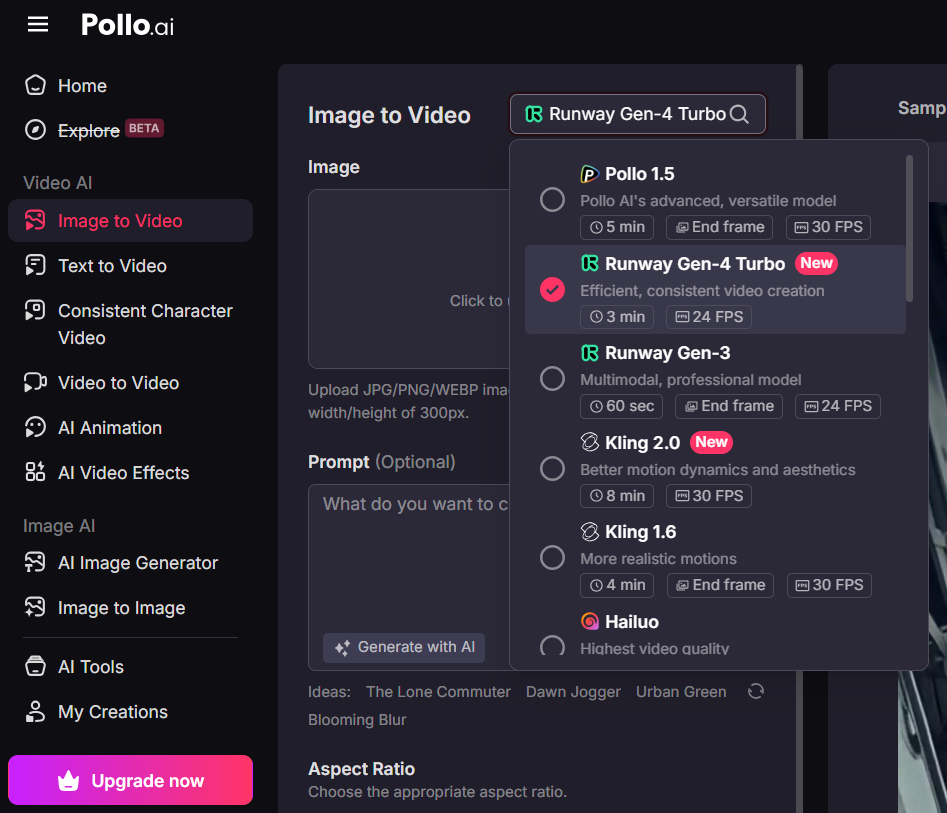
It also supports text to video AI and video to video AI, and offers an extensive range of video settings that allow you to dictate aspects like aspect ratio, length, etc.
Moreover, for professional AI videos, you can try the AI avatar generator and AI product avatar to create long avatar videos directly from your uploaded images. On the other hand, TikTV.AI Shorts is suitable for generating engaging short-form videos for social media platforms.
With so many different video models available and powerful generation functions, TikTV.AI is indeed a good option if you are interested in AI video creation.
Conclusion
Runway's error "Please try later" is caused by different issues. Here, we have discussed the top fixes you can do.
However, if Runway is giving you errors, TikTV.AI can be a better alternative. Instead of waiting for the "Please try later" message to go away, you can use Runway's models directly within TikTV.AI—along with other advanced AI models. Check out TikTV.AI now!