
If you want people to purchase your products, they first need to know how to use them. Any winning tutorial must be insightful, entertaining, and relatable, but hiring actors to show your products in action can be slow and expensive. So, why not create tutorial UGC ads with AI?
In this step-by-step guide, we’ll show you how you can use TikTV.AI to turn basic product details into a creator-led tutorial video that feels authentic and engaging enough to drive sales!
TL;DR
TikTV.AI is the best way to create tutorial UGC ads in minutes. Using its tutorial ugc ads maker, all it takes is a few reference product/subject images and a detailed prompt to make a scroll-stopping visual that can drive sales. Plus, its vast creative suite has powerful features like Marketing Studio, TikTV Agent, and Creative Studio, just to name a few.
Best Hooks for Tutorial UGC Ads To Hold Viewer Attention
Launching a tutorial UGC ad that pulls in viewers and converts them is all about your ability to be impactful in the first few seconds. So, let’s look at a few winning hooks that tend to work best:
- Open with the End Result: Showing audiences the outcome before explaining how you achieved it engages their curiosity; people will be compelled to stick around for the full tutorial until they understand how you did it.
- Use a Relatable Question: Try to ask audiences a relatable question like “Are you tired of…” or “Do you need an easier way to…”; if you can get people to say, ‘yes I struggle with that’, they will keep watching for an answer.
- Offer a Quick Tip: Most audiences are open to learn solutions to problems, especially if they can be handled in a minute or less; start the tutorial by promising them an irresistible benefit/tip and showing them a fast way to pull it off.
- Start Mid-Action: Forget introductions and just get to the heart of the tutorial by instantly showing the product in action; the idea here is to use a fast-paced opening that doesn’t give audiences any chance to scroll away.
How To Create Tutorial UGC Ads with TikTV.AI: Step-by-Step
Polished Video Creation Starts Here
Join 10M+ creators using TikTV.AI to generate videos with every top model.
Try TikTV.AI for Free
Using the TikTV.AI tutorial UGC ads maker only takes a few simple steps. In minutes, you’ll have a post-ready video to use in your ad campaigns, so let’s get started:
Head to the Tutorial UGC Ads Tool
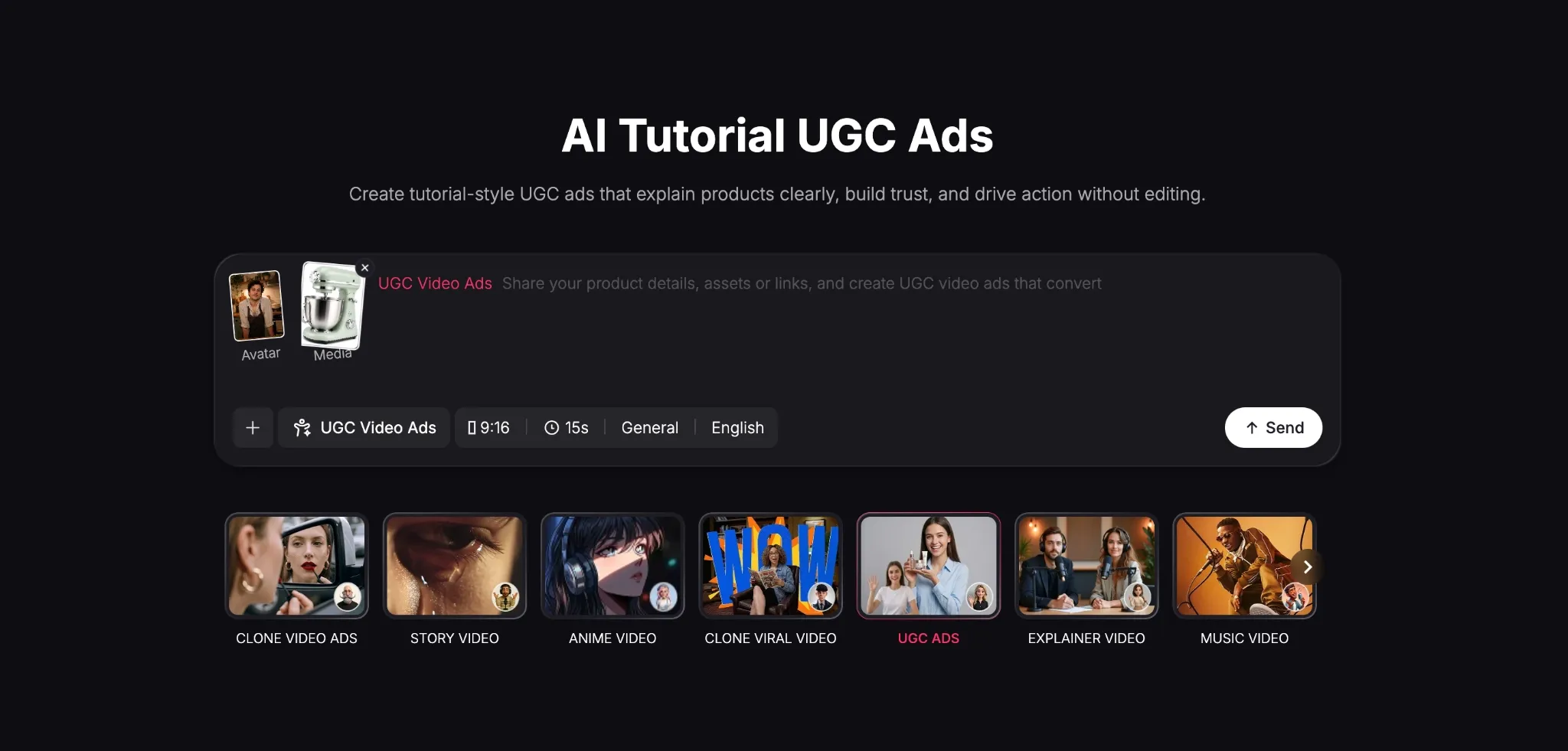
Go to TikTV.AI’s tutorial UGC ads maker and upload images of the product and the avatar you want presenting it, or choose an AI avatar from the TikTV.AI library. Feel free to add a URL link to the product. For our test, we tried to create a tutorial UGC ad for a home kitchen mixer.
Paste Your Video Prompt/Script
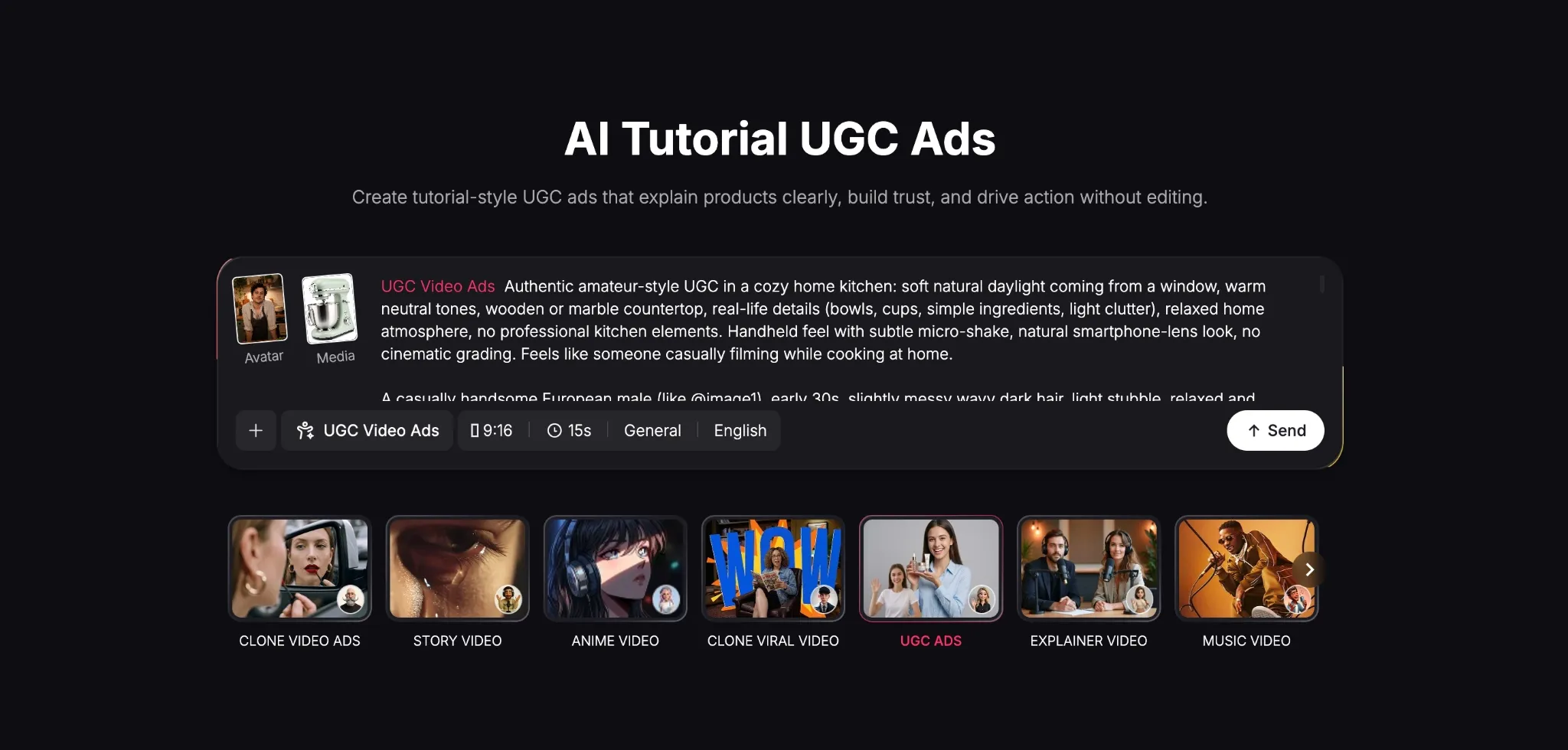
The next thing is to paste the script or prompt that describes the tutorial UGC ad you have envisioned in detail. The more descriptive you are to the AI video generator, the better. Explain the actions of the avatar, the setting it takes place in, the tone of the video, the dialogue, etc.
Check the Visual Brief
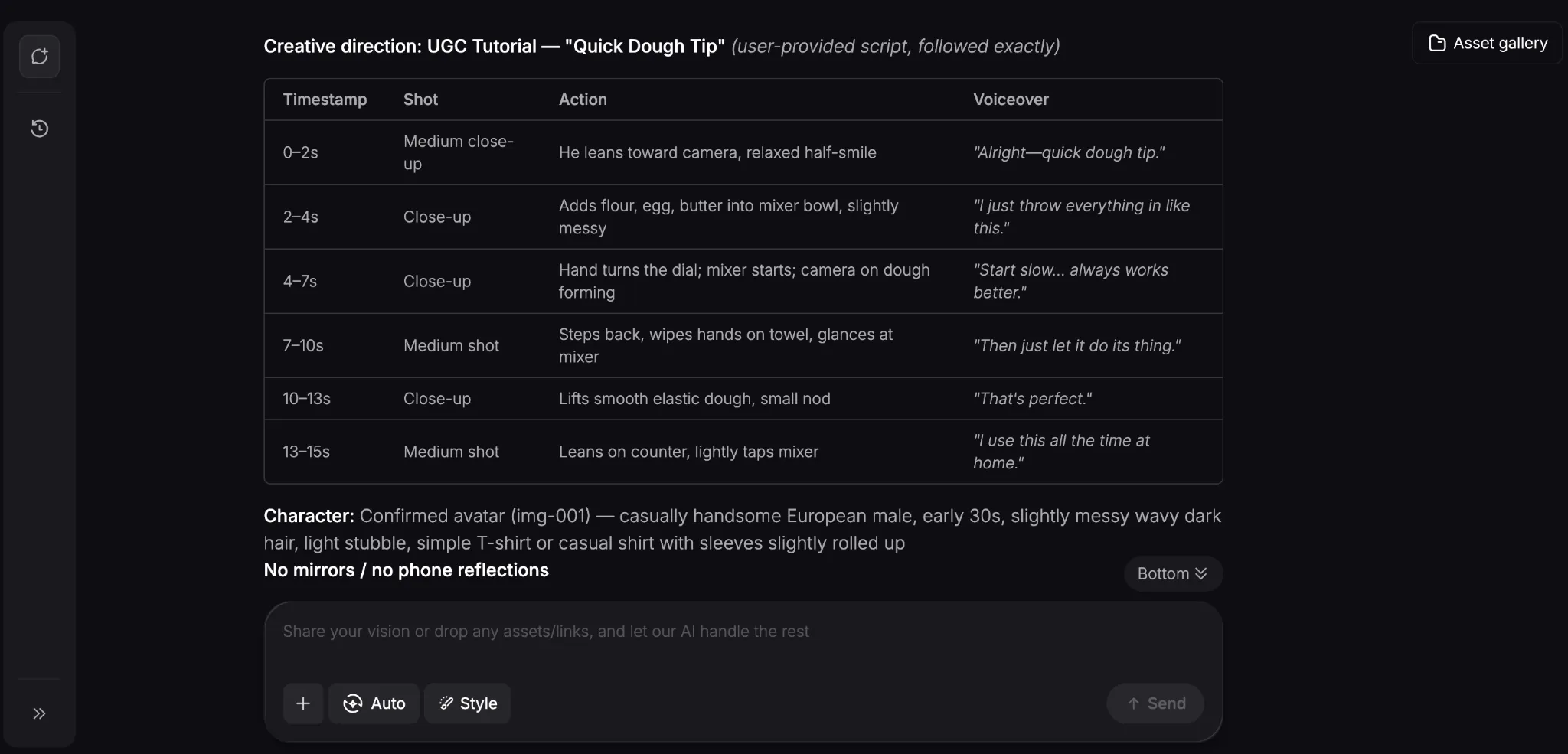
After you click ‘Send’, the AI video agent will analyze your request and start by generating a creative brief of the tutorial video in detail that you’re free to review. Within minutes, it will start to render the UGC ad, so try to be patient.
Download Your Tutorial UGC Ad
Once it’s ready, you can preview the UGC video ad. If it’s to your liking, you can download it, but if you want to make further changes, then simply describe what you want in the prompt box. Here’s how our tutorial test ad came out:
Right away, the whole sequence looks like a live recording made by a real creator. Everything from the voiceover to the avatar’s laidback attitude and mannerisms feels incredibly natural.
But most importantly, how the avatar showcased and interacted with the mixer was so realistic. It even sounded like a real mixer being used in the kitchen, so this was definitely a solid result.
Popular Use Cases for Creating Tutorial UGC Ads with AI
Tutorial UGC ads can do well to build a relationship between prospects and your products even before they get their hands on them. In this regard, some of the ways you can use them include:
- Health & Fitness Guides: AI avatars can help showcase fitness product ads and even demonstrate exercises, giving customers a clear, daily tutorial they can follow.
- Before-and-After Guides: For beauty and fashion, you can create skincare routine ads that showcase dramatic transformations in action and prove the product’s effectiveness.
- Educational/Coaching Guides: Explain complex topics and concepts using visual course guides, making learning for both students and new employees easier.
- Home Decor/Interior Design: Show customers unique ways of how and where to place furniture across rooms, inspiring new home design ideas and creativity.
Discover Other TikTV.AI Features to Use In Content Creation
Tutorial UGC ads give people insight into your products, but what about the rest of your campaigns? Rather than scatter time and resources, you’ll quickly find that TikTV.AI can help!
As the ultimate AI creative suite for marketers, creators, sellers, and brands, the platform is powered by top-class AI models like Seedance 2.0, Kling, Veo 3.1, GPT Image 2, and others.
But what makes TikTV.AI special is multiple workflow access. Starting with Marketing Studio, you can use it to create ready-to-use ads like product demos, before and afters, launch videos, etc.
You can also bolster your e-commerce listings and brand campaigns here. With access to various tools like the real estate promo maker, you can produce sales-ready videos in minutes.
And what if you need a unified space to turn raw ideas into content? Go ahead and check out Creative Studio to generate pro-level images, videos, avatars, and audio, all in one place.
For those focused on social media, try TikTV Agent. It automates the entire video production to generate post-ready clips in minutes for TikTok, Instagram, etc, so there’s zero manual editing!
And even if you still need more tailored tools, you can explore TikTV.AI’s 200+ specialized workflow apps that support countless creative use cases. So, why not try them out today?!
Conclusion
Tutorials can be an invaluable tool for driving sales, so don’t waste time on traditional video production. Just use TikTV.AI to start generating visually engaging content that feeds your ad campaigns in minutes!