InShot AI 视频编辑器
InShot 专注于移动优先的快速编辑,提供 AI 字幕、特效和简单的时间轴工具,让你随时随地轻松优化社交视频。除了编辑,TikTV AI 还能将想法、链接或图片转化为完整的、可发布的视频,并结合高级模型和 TikTV 智能体。立即免费试用!
Key Features
Mobile First Editing Workflow : Edit and publish videos entirely from your phone, anytime, anywhere.Auto Captions for Instant Subtitles : Generate subtitles automatically in multiple languages with minimal effort.AI Cut for Removing Pauses and Fillers : Clean up videos by automatically trimming silence and unnecessary speech.AI Background Removal for Flexible Editing : Remove backgrounds from subjects without using a green screen.Smart Tracking for Moving Subjects : Keep effects, text, or elements aligned with moving objects.Rich Effects, Filters, and Transitions Library : Enhance visuals with a wide range of creative styles and effects.Auto Beat Sync for Music-Driven Edits : Match video cuts and transitions to the rhythm of music automatically.Built-in Music Library for Easy Selection : Access a curated library of tracks to quickly match your video’s mood.Flexible Export for Social Platforms : Export videos in multiple resolutions and formats optimized for sharing.
Mobile First Editing Workflow
InShot is designed primarily for mobile devices, offering a streamlined editing experience optimized for touch interaction.
This makes it convenient for quick edits without needing a desktop setup, but it also means workflows are limited to smaller screens and mobile environments.
For example, a creator filming content throughout the day can immediately edit clips, add captions, and post to TikTok or Instagram directly from their phone without waiting to access a computer.
TikTV.AI takes a more flexible approach. You can create videos on mobile through its use app, but also switch to a web-based platform with a much richer toolset, including multi-model generation, a video agent, and full video workflows.
This means you can start on your phone, then move to a desktop for more advanced creation instead of being confined to one device.
Auto Captions for Instant Subtitles
InShot can detect speech and turn it into captions without manual typing, including support for multiple languages and basic styling. This helps videos stay understandable even when muted.
For example, a creator making Instagram Reels can instantly add subtitles so viewers scrolling without sound still follow the message, improving watch time and engagement.

InShot makes subtitles easy by automatically detecting speech and generating captions with basic styling, helping videos stay clear on mute. It works well for quick edits, but still requires manual workflows around existing clips.
TikTV.AI goes further. Its AI caption generator delivers highly accurate transcription, precise timing, and one-click syncing, so captions match speech naturally without adjustment.
It also applies clean, readable styles automatically, making videos instantly more professional and ready to share.
AI Cut for Removing Pauses and Fillers
The AI cut feature of InShot identifies pauses, filler words, and silent segments, then removes them to create a smoother flow. It reduces the need for manual trimming on timelines.
For instance, a YouTuber recording a talking-head video can quickly remove awkward pauses and tighten delivery before posting, saving editing time.

AI Background Removal for Flexible Editing
InShot’s background removal isolates people or objects from the original footage, allowing users to place them onto new backgrounds or scenes. This expands creative flexibility without complex tools.
A marketer can shoot a simple product demo at home, remove the background, and place it into a cleaner branded setting for social media ads.

InShot makes background removal simple by isolating subjects and letting you place them into new scenes, which works well for quick edits. However, it still relies on manual workflows after extraction.
TikTV.AI delivers cleaner, more precise results when you remove background of a video. It uses AI to detect subjects accurately, keeping edges sharp and avoiding quality loss.
The output stays clear and reusable, making it easy to drop into ads, demos, or websites with a more production-ready feel.
Smart Tracking for Moving Subjects
InShot’s smart tracking allows overlays like text, stickers, or effects to follow a subject throughout the video. This creates more dynamic and visually engaging edits.
For example, a fitness creator can attach labels or highlights to a moving body part during a workout clip, making instructions clearer.

Rich Effects, Filters, and Transitions Library
InShot offers numerous filters, transitions, and visual effects such as glitch, retro, blur, and cinematic overlays. These help transform raw footage into stylized content quickly.
A social media manager can apply trendy visual styles to match current platform aesthetics, making brand content feel more relevant and eye-catching.
TikTV.AI delivers a more advanced transition system with richer and more diverse effects, including dynamic styles like splash transition and melt transition.
These feel more cinematic and varied, helping videos stand out visually rather than relying on basic, repetitive transitions.
Auto Beat Sync for Music-Driven Edits
InShot analyzes the audio track and aligns cuts, transitions, and motion timing with the beat, creating more polished and rhythmic videos without manual syncing.
A content creator can turn a series of clips into a TikTok-style montage that naturally follows the music, making it more engaging and shareable.
Built-in Music Library for Easy Selection
InShot provides a built-in music library with a range of genres and ready-to-use tracks, allowing users to add background music without sourcing audio externally. This simplifies the editing process and helps videos feel more complete and engaging.
For example, a lifestyle creator editing a travel vlog can quickly pick a calm or cinematic track directly inside InShot, sync it with clips, and publish the video to Instagram or YouTube without needing to search for music on other platforms.
Flexible Export for Social Platforms
InShot supports exports up to 4K and 60fps, along with different aspect ratios for various platforms. This ensures content looks sharp and fits platform requirements.
For example, a creator can edit once and export both vertical (9:16) for TikTok and horizontal (16:9) for YouTube, without needing separate tools.
Who Actually Uses InShot, and How
Social Media Creators:
Creators use InShot to trim clips, add captions, sync to music, and apply trendy effects for TikTok or Reels. For example, a lifestyle influencer can shoot daily footage, edit on mobile, add subtitles, and post within minutes.
Small Business Owners:
Entrepreneurs use InShot to make simple product demos or promos by combining clips, adding background music, and overlaying text. A Shopify seller, for instance, can turn raw product footage into a clean Instagram ad in one sitting.
YouTubers:
InShot helps YouTubers cut out pauses with AI Cut, add captions, and polish videos quickly. A solo creator can record a short tutorial, clean it up on their phone, and upload without using desktop software.
Freelancers & Marketers:
Marketers use InShot to quickly produce short-form content like ads or social posts. A freelancer can edit a client’s raw clips, add branded text, and deliver a ready-to-publish video the same day.
Students & Educators:
Students and teachers use InShot to create presentations, explainers, or class projects. A student can combine slides, voiceover, and visuals into a short educational video and submit it directly.
InShot vs CapCut vs TikTV.AI
| Features | InShot | CapCut | TikTV.AI |
| Core Workflow | Mobile editing | AI + editing + templates | AI-first video and image generation |
| AI Capabilities | Basic (captions, cut) | Advanced (AI video, templates, auto edit) | Full generation + multi-model |
| Video Creation | Edit existing clips | Generate + edit videos | text to video/ reference to video/ video agent |
| Templates & Effects | Filters, transitions | Large template ecosystem | Effects + 100+ scenario-based use cases |
| Platform Support | Mobile-focused | Mobile + desktop + web | Web + Mobile |
| Agent | None | Partial (AI tools, no full agent) | Full TikTV Agent (simple ideas to complete videos) |
InShot stands out as a simple, mobile-first video editor designed for quick edits, captions, and social-ready formatting. It works well for creators who already have footage and need to polish it fast.
CapCut expands this with stronger AI tools and a larger template ecosystem, offering more flexibility in editing and styling.
TikTV.AI takes a different approach, going beyond editing by turning ideas, links, or images into complete, ready-to-publish videos through its multi-model and video agent workflow.
Is InShot Enough for Modern Video Creation
Pros
- Simple, Fast Mobile Editing: InShot is easy to pick up and built for speed. You can trim, add captions, apply effects, and export within minutes, making it ideal for quick social content creation on the go.
- Helpful AI Tools for Polishing Videos: Features like Auto Captions, AI Cut, and background removal reduce manual work and make basic editing more efficient, especially for talking videos and short-form content.
- Strong Fit for Social Media Formats: With flexible aspect ratios, music, effects, and quick export options, InShot is well-suited for platforms like TikTok, Instagram Reels, and YouTube Shorts.
Cons
- Limited to Editing, not Full Video Creation: InShot mainly works with existing footage. It doesn’t generate complete videos from ideas, scripts, or inputs, which limits its use for more advanced content workflows.
- Less Control and Depth for Complex Projects: Compared to more advanced or desktop-based tools, it offers fewer options for multi-scene structuring, detailed storytelling, or large-scale video production.
Where Does InShot Really Stand Today
InShot sits firmly in the category of fast, mobile-first video editing tools built for everyday creators. It is designed to simplify the final step of content creation—polishing clips, adding captions, syncing music, and preparing videos for social platforms.
Rather than reshaping how videos are created, InShot focuses on making editing more accessible and efficient, especially for short-form content. Its growing set of AI features enhances speed and convenience, but the core remains editing-centric.
As content demands shift toward faster production and more complete outputs, InShot represents a practical solution for refining footage, rather than generating fully structured videos from scratch.
Looking for More Than Just Editing? Try TikTV.AI!
TikTV.AI is an all-in-one AI video and image creation platform built for creators and marketers who want to move beyond simple editing. Instead of starting with footage, it helps you turn ideas into complete videos in one smooth workflow.
One of its key strengths is access to multiple leading video models in one place.
You can choose different models based on your needs, whether using Kling AI for faster generation or using Seedance for higher-quality output. This flexibility makes it easier to adapt your workflow without relying on separate tools.
At the core of the platform is the TikTV Agent, which takes a simple input such as a product link, script, or concept and turns it into a structured, multi-scene video.

The output is already polished and ready to post. For example, a marketer can turn a product page into a UGC AI video or a short promotional video without filming or editing.
TikTV.AI also offers 100+ scenario-based video use cases designed for real content tasks.
You can use AI music video generator or clone video ads by selecting a use case and adding your inputs. The system handles the structure and visuals, so you can focus on the idea rather than the editing process.
In short, while InShot helps refine existing clips, TikTV.AI helps you create complete, ready-to-use videos from the ground up.
主要功能
移动优先编辑工作流: 随时随地通过手机编辑和发布视频。
自动字幕,即时生成: 自动生成多种语言字幕,省时省力。
AI 剪辑,去除停顿和口头禅: 自动修剪沉默和不必要的言语,优化视频。
AI 背景移除,灵活编辑: 无需绿幕即可移除主体背景。
智能追踪移动主体: 让特效、文本或元素与移动对象保持对齐。
丰富的特效、滤镜和转场库: 用各种创意风格和特效增强视觉效果。
移动优先编辑工作流
InShot 主要为移动设备设计,提供专为触控交互优化的流畅编辑体验。
这使得快速编辑非常方便,无需桌面设备,但也意味着工作流受限于小屏幕和移动环境。
例如,创作者白天拍摄内容后,无需等待访问电脑,即可直接通过手机编辑片段、添加字幕并发布到 TikTok 或 Instagram。
TikTV AI 采用更灵活的方式。你可以通过其应用在移动设备上创建视频,也可以切换到基于网络的平台,该平台具有更丰富的功能集,包括多模型生成、视频 智能体和完整的视频工作流。
这意味着你可以从手机开始,然后转移到桌面进行更高级的创作,而不会局限于一台设备。
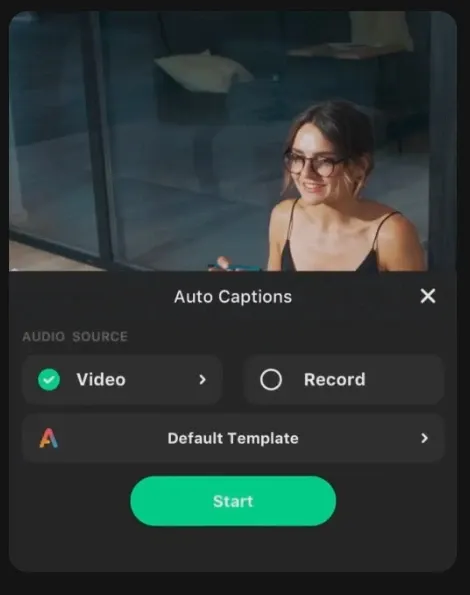
自动字幕,即时生成
InShot 可以检测语音并自动生成字幕,无需手动输入,支持多种语言和基本样式。这有助于视频在静音时也能保持易懂。
例如,制作 Instagram Reels 的创作者可以即时添加字幕,以便在无声浏览时,观众仍能理解信息,从而提高观看时长和互动。
InShot 通过自动检测语音并生成带基本样式的字幕,让字幕制作变得简单,有助于视频在静音时保持清晰。它适用于快速编辑,但仍需要围绕现有片段进行手动工作流操作。
TikTV AI 更进一步。它的 AI 字幕生成器提供高度准确的转录、精确的时间轴和一键同步,使字幕与语音自然匹配,无需调整。
它还会自动应用清晰、易读的样式,使视频立即变得更专业,随时可分享。
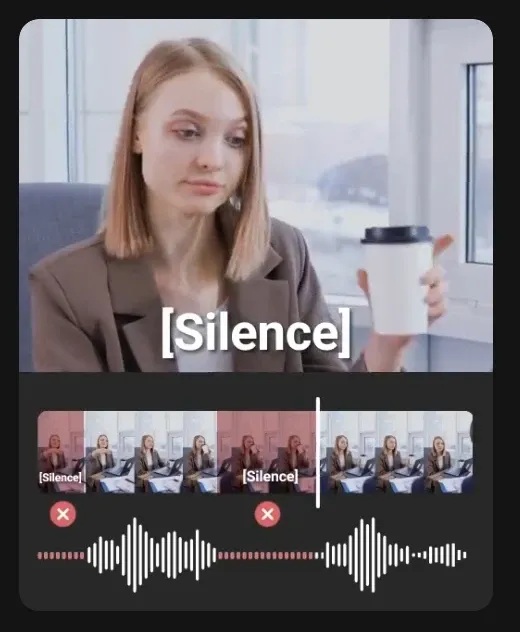
AI 剪辑,去除停顿和口头禅
InShot 的 AI 剪辑功能可以识别停顿、口头禅和静音片段,然后将其移除以创建更流畅的流程。它减少了在时间轴上手动修剪的需求。
例如,YouTube 博主录制一段人物讲话视频时,可以在发布前快速去除尴尬的停顿并紧凑表达,从而节省编辑时间。
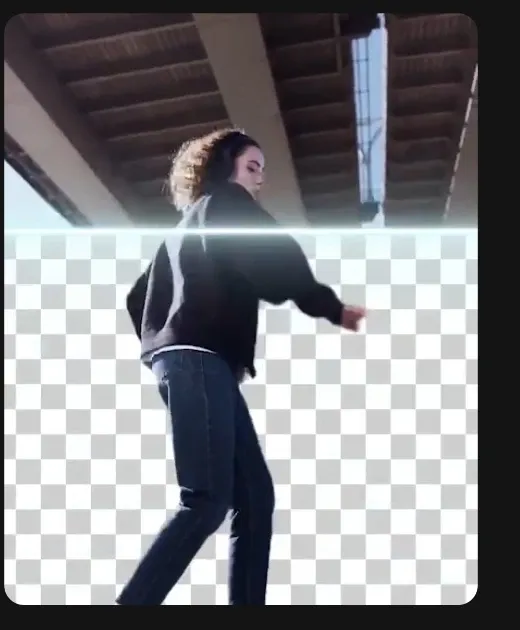
AI 背景移除,灵活编辑
InShot 的背景移除功能可以将人物或物体从原始素材中分离出来,让用户将其放置到新的背景或场景中。这在不使用复杂工具的情况下扩大了创作灵活性。
营销人员可以在家中拍摄简单的产品演示,移除背景,然后将其放置到更简洁的品牌环境中,用于社交媒体广告。
InShot 通过分离主体并允许你将其放置到新场景中,使背景移除变得简单,这对于快速编辑非常有效。然而,在提取之后,它仍然依赖于手动工作流。
TikTV AI 在你移除视频背景时提供更清晰、更精确的结果。它使用 AI 精确检测主体,保持边缘锐利,避免质量损失。
输出效果保持清晰且可重复使用,使其易于融入广告、演示或网站,呈现出更具制作感的视觉效果。
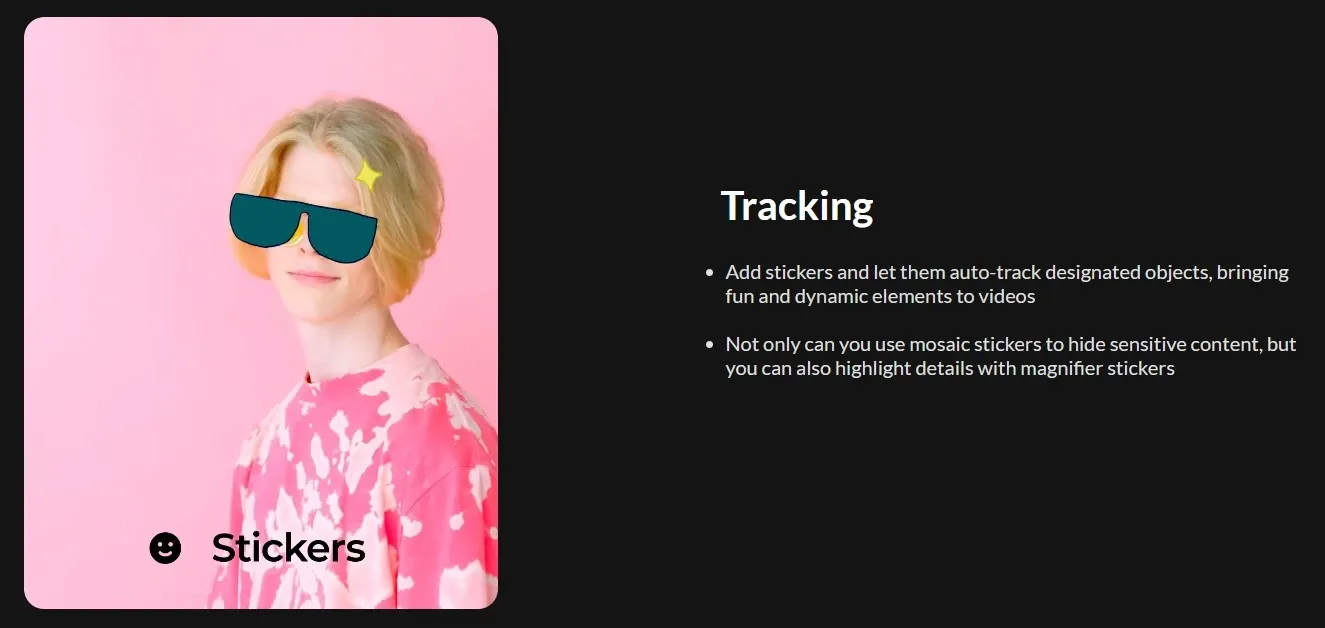
智能追踪移动主体
InShot 的智能追踪功能允许文本、贴纸或特效等叠加元素在视频中跟随主体移动。这能创建更具动感和视觉吸引力的编辑。
例如,健身创作者可以在训练片段中,为移动的身体部位添加标签或高光,使指导更清晰。
自动节拍同步,音乐驱动编辑
InShot 分析音轨,将剪辑、转场和运动时间与节拍对齐,无需手动同步即可创建更精致、更有节奏感的视频。
内容创作者可以将一系列片段制作成 TikTok 风格的蒙太奇,自然地跟随音乐节奏,使其更具吸引力和可分享性。
内置音乐库,轻松选择
InShot 提供了一个内置音乐库,包含各种流派和现成音轨,用户无需从外部获取音频即可添加背景音乐。这简化了编辑过程,并有助于视频更完整、更具吸引力。
例如,生活方式创作者编辑旅行 Vlog 时,可以直接在 InShot 内快速选择一首平静或电影感的音轨,将其与片段同步,然后发布到 Instagram 或 YouTube,而无需在其他平台搜索音乐。
灵活导出,适配社交平台
InShot 支持最高 4K 和 60fps 导出,并提供适用于各种平台的 P 不同宽高比。这确保内容看起来清晰并符合平台要求。
例如,创作者可以一次编辑,然后为 TikTok 导出垂直(9:16)视频,为 YouTube 导出水平(16:9)视频,而无需单独的工具。
谁在使用 InShot,以及如何使用
创作者使用 InShot 修剪片段、添加字幕、同步音乐并为 TikTok 或 Reels 应用流行特效。例如,一位生活方式影响者可以拍摄日常素材,在手机上编辑,添加字幕,并在几分钟内发布。
企业家使用 InShot 通过组合片段、添加背景音乐和叠加文本来制作简单的产品演示或宣传片。例如,一个 Shopify 卖家可以一次性将原始产品素材制作成一个简洁的 Instagram 广告。
InShot 帮助 YouTube 博主使用 AI 剪辑功能去除停顿,添加字幕,并快速修饰视频。一位独立创作者可以在手机上录制一个简短教程,清理后直接上传,无需使用桌面软件。
营销人员使用 InShot 快速制作短视频内容,如广告或社交帖子。自由职业者可以编辑客户的原始片段,添加品牌文本,并在同一天交付可发布的视频。
学生和教师使用 InShot 制作演示文稿、解说视频或课堂项目。学生可以将幻灯片、旁白和视觉效果组合成一个短小精悍的教育视频并直接提交。
InShot 对比 CapCut 对比 TikTV AI
InShot 作为一款简单、移动优先的视频编辑器脱颖而出,专为快速编辑、添加字幕和社交平台格式化而设计。它非常适合那些已有素材并需要快速修饰的创作者。
CapCut 在此基础上,凭借更强大的 AI 工具和更大的模板生态系统进行了扩展,在编辑和样式方面提供了更大的灵活性。
TikTV AI 采取了不同的方法,它不仅仅是编辑,而是通过其多模型和视频 智能体工作流,将想法、链接或图像转化为完整、可发布的视频。
InShot 足以满足现代视频创作需求吗
简单、快速的移动编辑: InShot 易于上手且专为速度而生。你可以在几分钟内修剪、添加字幕、应用效果并导出,非常适合随时随地快速创建社交内容。
用于修饰视频的实用 AI 工具: 自动字幕、AI 剪辑和背景移除等功能减少了手动工作,使基础编辑更高效,特别是对于讲话视频和短视频内容。
完美适配社交媒体格式: 凭借灵活的宽高比、音乐、效果和快速导出选项,InShot 非常适合 TikTok、Instagram Reels 和 YouTube Shorts 等平台。
仅限于编辑,而非完整的视频创作: InShot 主要处理现有素材。它无法从想法、脚本或输入生成完整的视频,这限制了其在更高级内容工作流中的使用。
复杂项目的控制和深度不足: 与更高级或基于桌面的工具相比,它在多场景结构、详细故事叙述或大规模视频制作方面的选项较少。
InShot 在当今处于什么位置
InShot 牢固地定位在为日常创作者打造的快速、移动优先视频编辑工具类别中。它旨在简化内容创作的最后一步——修饰片段、添加字幕、同步音乐以及为社交平台准备视频。
InShot 没有重塑视频的创作方式,而是专注于使编辑更易用、更高效,特别是对于短视频内容。其不断增长的 AI 功能增强了速度和便利性,但核心仍以编辑为中心。
随着内容需求转向更快的制作和更完整的输出,InShot 代表了一种用于优化素材的实用解决方案,而不是从头开始生成完整结构的视频。
想获得比编辑更多的功能?试试 TikTV AI!
TikTV AI 是一个一体化的 AI 视频和图像创作平台,专为希望超越简单编辑的创作者和营销人员而打造。它不是从素材开始,而是帮助你将想法转化为完整的视频,实现流畅的工作流程。
其主要优势之一是可以在一个地方访问多个领先的视频模型。
你可以根据自己的需求选择不同的模型,无论是使用 Kling AI 进行更快的生成,还是使用 Seedance 获得更高质量的输出。这种灵活性使得你无需依赖单独的工具即可更轻松地调整工作流。
该平台的核心是 TikTV 智能体,它接受简单的输入,例如产品链接、脚本或概念,并将其转化为结构化的多场景视频。
输出已经经过润色并可直接发布。例如,营销人员可以将产品页面转化为一个 UGC AI 视频或短宣传视频,无需拍摄或编辑。
TikTV AI 还提供 100 多个基于场景的视频用例,专为真实内容任务而设计。
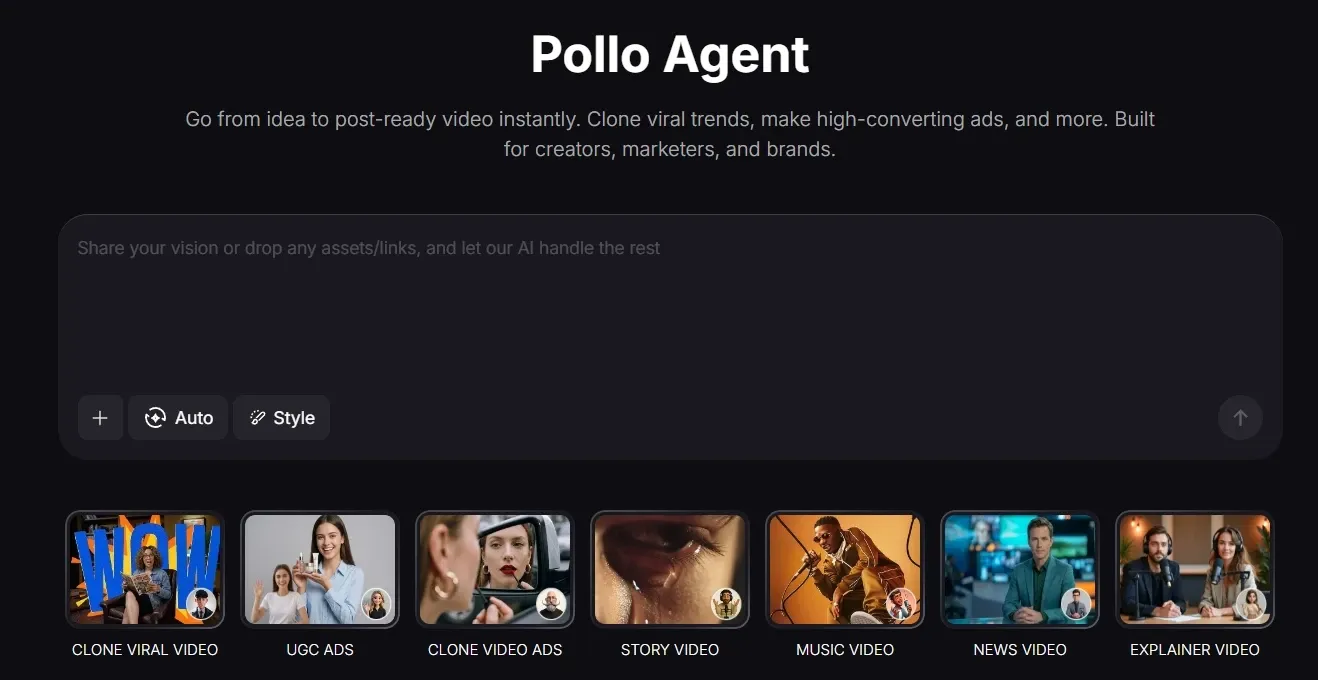
在 TikTV AI 上发现其他 AI 视频编辑器
常见问题解答
什么是 InShot AI 视频编辑器?
InShot 是一款移动优先的视频编辑应用,旨在快速创建适合社交媒体的内容。它将基本编辑工具与 AI 功能相结合,例如自动字幕、AI 剪辑、背景移除和节拍同步,让你无需陡峭的学习曲线即可轻松美化视频。它特别受那些希望为 TikTok、Instagram 和 YouTube 等平台快速编辑视频的创作者欢迎。
InShot 可以从头开始制作视频吗?
不完全是。InShot 主要处理现有素材,帮助你编辑和增强片段。如果你想从想法、脚本或链接生成完整的视频,像 TikTV AI 这样的工具更适合,因为它们可以处理整个创作过程,而不仅仅是编辑。
InShot 支持 AI 视频功能吗?
是的,但它们专注于编辑效率而非完整创作。AI 字幕、AI 剪辑和背景移除等功能有助于加快工作流程,但它们不会生成完整的视频或多场景内容。
InShot 适合社媒内容吗?
是的,它是为社交平台量身打造的。你可以轻松调整长宽比、添加音乐、字幕和效果,然后导出针对 TikTok、Instagram Reels 或 YouTube Shorts 优化的视频。
我可以用 InShot 进行专业视频制作吗?
它非常适合轻量级项目和快速编辑,但并非专为复杂的故事讲述或大规模制作而设计。对于更结构化、多场景的视频或活动级别的内容,像 TikTV AI 这样能生成完整输出的平台会更有效率。
InShot 可以在桌面设备上使用吗?
InShot 主要为移动设备(iOS 和 Android)设计。如果你喜欢跨设备工作或需要更灵活的工作流程,TikTV AI 等网络平台可能会提供更流畅的体验。