VidMage AI 视频生成器
VidMage 视频生成器是一个面向创作者的 AI 换脸和视频创作平台。除了换脸,寻求模型多样性的创作者可以将 TikTV AI 作为一站式解决方案,它结合了先进的换脸功能、多样化的 AI 模型和无限的创意可能性。切换到 TikTV AI,开启更深度的创作。
Key Features of VidMage
Cinematic Video Face Swap: Effortlessly upload and swap faces in any video with studio-quality results, ensuring smooth skin-tone blending and natural expressions.Real-Time Live Streaming Overlay: Seamlessly overlay chosen faces live during Zoom, FaceTime, or OBS sessions for instant digital persona transformation.Multi-Subject Video Processing: Support for swapping multiple faces within a single video, perfect for group scenes, cinematic clips, and dynamic storytelling.High-Fidelity Lip-Sync Accuracy: Maintain perfect synchronization between audio and mouth movements, ensuring your face-swapped videos look and feel authentic.Apple Silicon Optimized Performance: Leverage the power of local hardware for lightning-fast video rendering and real-time processing on Mac devices.Privacy-First Offline Operation: Process all video data completely locally on your device, safeguarding sensitive content with a 100% offline workflow.Selective Feature Editing: Fine-tune specific facial elements—such as eyes, nose, or mouth—to achieve the exact look required for your video project.Automated Batch Video Swaps: Streamline your workflow with robust batch-processing capabilities, allowing you to apply face swaps across multiple video files simultaneously.
Cinematic Video Face Swap
Effortlessly upload and swap faces in any video with studio-quality results that rival professional post-production. VidMage AI ensures smooth skin-tone blending and preserves natural expressions, making the transition between the original and the new face virtually undetectable.
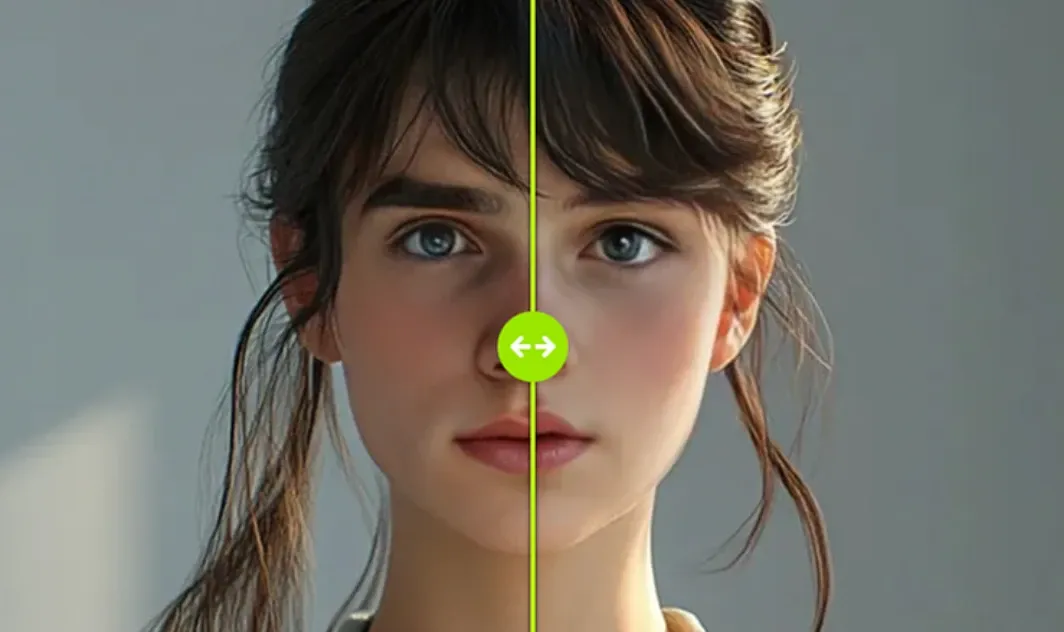
Compared to this, TikTV.AI video face swap allows you to seamlessly replace faces in virtually any type of video - from anime and movies to GIFs and beyond. It ensures the results maintain the essence of the original clip, making the transitions almost not noticeable to human eyes.
Real-Time Live Streaming Overlay
Transform your digital persona instantly by seamlessly overlaying chosen faces during live Zoom, FaceTime, or OBS sessions. VidMage AI allows for dynamic identity shifts in real-time, perfect for interactive streaming and creative virtual meetings.
Multi-Subject Video Processing
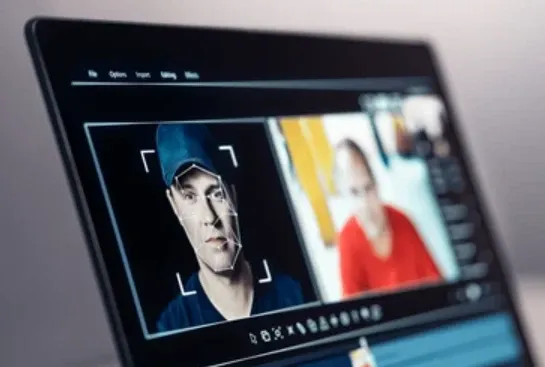
Take control of complex scenes with support for swapping multiple faces within a single video file. One of VidMage AI’s features is ideal for group scenes and cinematic clips, enabling creators to tell dynamic stories involving various characters without multiple rendering passes.
High-Fidelity Lip-Sync Accuracy
Maintain perfect synchronization between audio tracks and mouth movements for an incredibly authentic viewing experience. By precisely mapping speech patterns to the swapped face, VidMage AI ensures that every word looks and feels as though it were spoken by the new persona.
Apple Silicon Optimized Performance
Leverage the full power of your Mac’s local hardware for lightning-fast video rendering and smooth real-time processing. Specifically tuned for M-series chips, this VidMage AI’s optimization ensures peak efficiency and reduced wait times during even the most demanding editing tasks.
Privacy-First Offline Operation
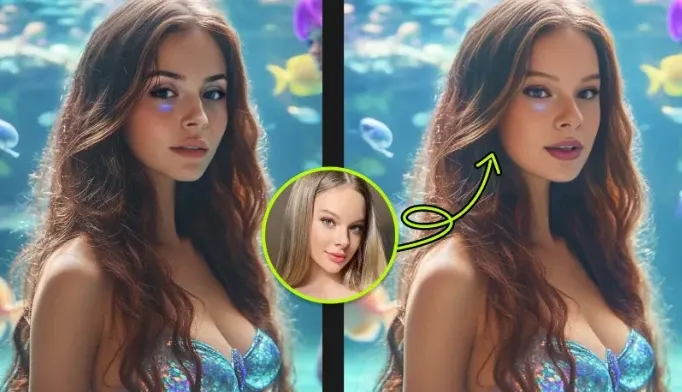
Safeguard your sensitive content with a 100% offline workflow that processes all video data completely on your local device. By eliminating the need to upload files to the cloud, VidMage AI enables you to maintain total ownership and security over your personal and professional media.
Selective Feature Editing
Fine-tune your results with precision by editing specific facial elements such as the eyes, nose, or mouth independently. This VidMage AI’s granular control allows you to achieve the exact aesthetic required for your project, ensuring the final look meets your creative vision.
Automated Batch Video Swaps
Streamline your production workflow using robust batch-processing capabilities that apply face swaps across multiple files simultaneously. This VidMage AI’s automation saves hours of manual labor, making it easy to manage large-scale video projects or consistent content series.
Use Cases of VidMage AI Video Generator
1. Social Media Face Swap Content
Create eye-catching face-swapped videos for TikTok, Instagram Reels, YouTube Shorts, and X. VidMage makes it easy to turn ordinary clips into entertaining, shareable content that grabs attention fast.
2. Live Streaming Persona Transformation
Use VidMage’s real-time live streaming overlay to transform your on-screen identity during Zoom, FaceTime, or OBS sessions. It is ideal for virtual events, interactive streams, and creative online presentations.
3. Group Scene Editing
Swap multiple faces in a single video to handle team content, family videos, or group scenes with ease. VidMage helps creators produce multi-subject edits without needing complex post-production workflows.
4. Lip-Synced Character Videos
Generate face-swapped videos with high-fidelity lip-sync accuracy for more authentic results. This is a strong fit for character performances, dubbing-style content, and narrative video projects.
Pros & Cons of Vidmage
| Pros | Cons |
| Sleek, intuitive interface for both web & Mac platforms | Mac app is Apple-exclusive—no Windows/Linux desktop support yet |
| Real-time swapping and selective feature editing | Requires decent hardware—can be slower on older Macs |
| Full offline privacy for Mac users | Web interface demands uploads—calls for trust in their data handling |
VidMage AI vs. TikTV.AI vs. DomoAI
| Features | VidMage AI | TikTV.AI (Top Pick) | DomoAI |
| Core Architecture | Single Face-Swap Engine | Multi-Model Aggregated Hub | Single Stylization Model |
| Integrated Engines | Proprietary Facial Mapping | Kling, Luma, Veo 3.1, Flux 2 (70+) | Proprietary Anime Model |
| Creative Diversity | Face Transformation Only | Unlimited (All Styles & Niches) | Anime & Sketch Styles |
| Max Video Length | Short Clips | Up to 50 Mins (Long-form Stories) | Social Media Shorts |
While VidMage operates within the narrow confines of facial coordinates, TikTV.AI strives to understand the entire physical world. This "difficulty" is precisely why it is superior—it isn't just playing a game of digital stickers; it is performing true generative synthesis.
For those who find simple tools too restrictive, TikTV.AI’s "complexity" is actually its greatest strength: it offers a creative ceiling that a single-model tool simply cannot reach.
VidMage 的主要功能
电影级视频换脸:轻松上传并在任何视频中换脸,获得影棚级效果,确保肤色融合自然,表情生动。
实时直播叠加:在 Zoom、FaceTime 或 OBS 会话期间,无缝实时叠加选定的人脸,即时转换数字形象。
多主体视频处理:支持在单个视频中交换多个人脸,非常适合群组场景、电影片段和动态叙事。
高保真唇形同步精度:保持音频和口部动作完美同步,确保你的换脸视频看起来和感觉都真实。
Apple Silicon 优化性能:利用本地硬件的强大功能,在 Mac 设备上实现闪电般快速的视频渲染和实时处理。
隐私优先的离线操作:在你的设备上完全本地处理所有视频数据,通过 100% 离线工作流程保护敏感内容。
电影级视频换脸
轻松上传并在任何视频中换脸,获得媲美专业后期制作的影棚级效果。VidMage AI 确保肤色融合自然,保留原有表情,使原始面部和新面部之间的过渡几乎无法察觉。
与此相比,TikTV AI 视频换脸 让你几乎可以在任何类型的视频中无缝替换人脸——从动漫和电影到 GIF 等等。它确保结果保持原始片段的精髓,使过渡几乎不被肉眼察觉。
实时直播叠加
在实时 Zoom、FaceTime 或 OBS 会话期间,通过无缝叠加选定的人脸,即时转换你的数字形象。VidMage AI 允许实时动态身份转换,非常适合互动直播和创意虚拟会议。
多主体视频处理
通过支持在单个视频文件中交换多个人脸来控制复杂场景。VidMage AI 的这一功能非常适合群组场景和电影片段,使创作者能够讲述涉及各种角色的动态故事,而无需多次渲染。
高保真唇形同步精度
保持音轨和口部动作的完美同步,以获得令人难以置信的真实观看体验。通过将语音模式精确映射到换脸,VidMage AI 确保每个单词看起来和感觉都像是新形象所说。
Apple Silicon 优化性能
充分利用你的 Mac 本地硬件的强大功能,实现闪电般的视频渲染和流畅的实时处理。VidMage AI 的优化专门针对 M 系列芯片进行了调整,即使在最严苛的编辑任务中也能确保最高效率并缩短等待时间。
隐私优先的离线操作
通过 100% 离线工作流程保护你的敏感内容,该工作流程完全在你的本地设备上处理所有视频数据。通过消除将文件上传到云端的需要,VidMage AI 让你能够完全拥有个人和专业媒体的所有权和安全性。
选择性特征编辑
通过独立编辑眼睛、鼻子或嘴巴等特定面部元素,精确微调你的结果。VidMage AI 的这种精细控制让你能够达到项目所需的精确美学效果,确保最终外观符合你的创作愿景。
自动化批量视频换脸
利用强大的批量处理功能简化你的制作工作流程,这些功能可以同时对多个文件应用换脸。VidMage AI 的这种自动化节省了数小时的手动劳动,使其易于管理大规模视频项目或一致的内容系列。
VidMage AI 视频生成器的用例
为 TikTok、Instagram Reels、YouTube Shorts 和 X 制作引人注目的换脸视频。VidMage 让你轻松将普通片段转化为有趣、可分享的吸睛内容。
使用 VidMage 的实时直播叠加功能,在 Zoom、FaceTime 或 OBS 会话期间转换你的屏幕形象。它非常适合虚拟活动、互动直播和创意在线演示。
在单个视频中交换多个人脸,轻松处理团队内容、家庭视频或群组场景。VidMage 帮助创作者制作多主体编辑,而无需复杂的后期制作工作流程。
生成具有高保真唇形同步精度的换脸视频,以获得更真实的效果。这非常适合角色表演、配音风格内容和叙事视频项目。
VidMage 的优缺点
VidMage AI 对比 TikTV AI 对比 DomoAI
虽然 VidMage 在面部坐标的狭窄范围内操作,但 TikTV AI 努力理解整个物理世界。这种“难度”正是其优越之处——它不仅仅是在玩数字贴纸游戏;它正在执行真正的生成式合成。
对于那些认为简单工具限制过多的人来说,TikTV AI 的“复杂性”实际上是其最大的优势:它提供了一个单模型工具根本无法达到的创作上限。

在 TikTV AI 上浏览更多 AI 视频生成器
常见问题解答
什么是 VidMage?
VidMage 是一款由 AI 驱动的工具,旨在支持内容和生产力工作流程。它通常结合了生成、重写和辅助功能,以便用户可以生成更清晰、更一致的输出。当你提供一个坚实的起点,并使用该工具来完善结构、措辞和语气时,它会发挥最佳作用。
VidMage 适用于哪些类型的用户和组织?
VidMage 适用于各种用户和组织类型,包括中型企业、小型企业、大型企业、自由职业者、非营利组织和初创公司。
VidMage 在我的 Mac 上如何运行?
VidMage 使用强大的人工智能在你的 Mac 上本地交换面孔。只需上传照片或视频,选择你想要交换的面孔,人工智能就会处理其余部分。它简单、快速,直接在你的 Mac 上运行,无需互联网即可进行处理。
支持哪些视频格式用于换脸功能?
VidMage 在线工具支持 MP4、MOV 和 M4V 视频格式进行换脸。免费用户可以在最长 15 秒、最大 100MB 的视频中换脸,付费用户则可支持最长 300 秒、最大 1024MB 的视频,非常适合快速编辑。
换脸安全吗?
VidMage 通过在 Mac 设备上本地处理数据来强调安全性。这意味着照片和视频保留在用户自己的硬件上,而不是发送到云端,从而提供对个人媒体内容更高水平的控制。